
Most hair transplant clinics don’t have a “lead problem.”
They have a WhatsApp execution problem.
Your ads, partners, and referral flow might be working — but conversions leak because:
- replies aren’t instant,
- the lead doesn’t send the right photos/info,
- the conversation dies after 1–2 messages,
- staff gets overwhelmed,
- there’s no consistent follow-up rhythm,
- and nobody can measure what’s actually happening.
This post breaks down a clinic-ready WhatsApp intake automation system that helps you:
- reply instantly (without sounding robotic),
- qualify patients smoothly,
- collect what the doctor needs the first time,
- escalate “hot” leads to a human fast,
- and run follow-ups that consistently push toward a booked consultation.
Why WhatsApp Is the #1 Conversion Bottleneck in Hair Transplant
WhatsApp is where most high-intent patients go because it’s fast and personal.
But that same “fast and personal” channel becomes chaos when:
- multiple coordinators share one inbox,
- messages come in multiple languages,
- photos are missing or unusable,
- and leads arrive outside office hours.
In hair transplant, speed matters because prospects usually message multiple clinics.
If you reply late, you’re not “losing a lead” — you’re funding your competitor’s sales team.
Where WhatsApp Leads Die (The 5 Leak Points)
- Slow first reply (or no reply after hours)
- Missing info (photos not sent, expectations unclear, budget unknown)
- No structured path (conversation jumps randomly, lead gets confused)
- No follow-up system (lead ghosts — clinic never re-engages properly)
- No tracking (you can’t improve what you don’t measure)
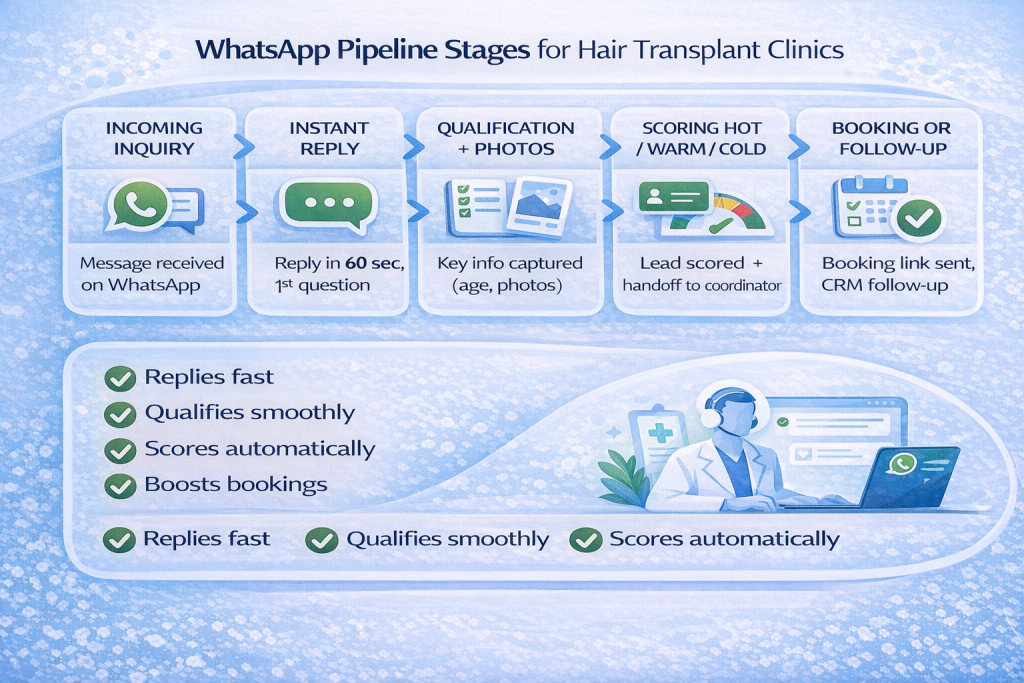
The System: A Simple WhatsApp Intake + Follow-Up Engine
Here’s the end-to-end flow you want:
Lead messages clinic → Instant reply → Quick qualification → Photo + needs capture → Lead scored → Human takeover for hot leads → Booking link sent → Follow-up timeline runs if silent → Everything logged to CRM
This isn’t about replacing your coordinators.
It’s about making sure your coordinators only spend time where they win: closing.
Step 1 — The Instant Reply System (0–60 seconds)
Your first message has one job: stop the lead from drifting away.
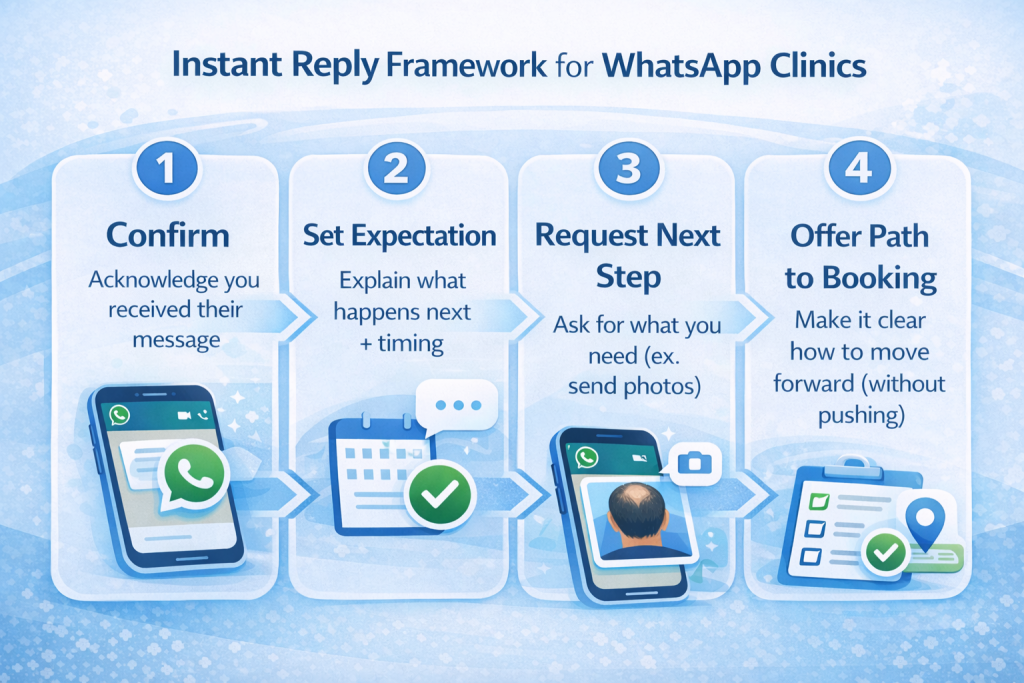
A high-performing instant reply does 5 things:
- Confirms you received the message
- Sets expectation (“2–3 quick questions”)
- Makes it easy to continue (buttons/short options if possible)
- Mentions the next step (photos or a quick evaluation)
- Reassures (“a specialist will review and reply”)
Example (human-sounding):
“Hi 👋 Thanks for reaching out. I can help with a quick evaluation.
To guide you properly, can I ask 2 quick questions:
- Hair or beard transplant?
- Your age?”
Then you move into structured qualification.
Step 2 — Qualification That Doesn’t Feel Like a Form
Most clinics either:
- ask too much too early (lead feels interrogated), or
- ask too little (doctor can’t evaluate, coordinator wastes time).
A clean middle path:
Minimum viable qualification (fast):
- Hair vs beard
- Age range
- Main goal (density / hairline / crown)
- Prior transplant? (yes/no)
- Photo request (clear + simple)
Photo request tip:
Don’t paste a massive checklist every time. Ask once clearly, then later just remind:
“Send your photos here whenever you’re ready and our team will review them.”
Step 3 — Lead Scoring + Human Handoff (So Your Team Focuses on Closers)
This is where clinics print money.
Instead of treating every chat equally, score leads based on:
- photos received (yes/no),
- stated timeline (“this month” vs “someday”),
- budget alignment,
- location/travel readiness,
- responsiveness.
Then automate the handoff:
- If “hot”: notify a coordinator instantly with a short summary
- If “warm”: continue follow-up + offer booking
- If “cold”: park them in a long-term nurture list
The key: automation does the sorting; humans do the closing.
Step 4 — Follow-Up That Actually Books Consultations
Most follow-up fails for two reasons:
- It’s random (“Just checking in…”)
- It doesn’t give the prospect a simple next step
Good follow-up is:
- short,
- polite,
- value-based,
- and always points toward one action (send photos / confirm date / book).
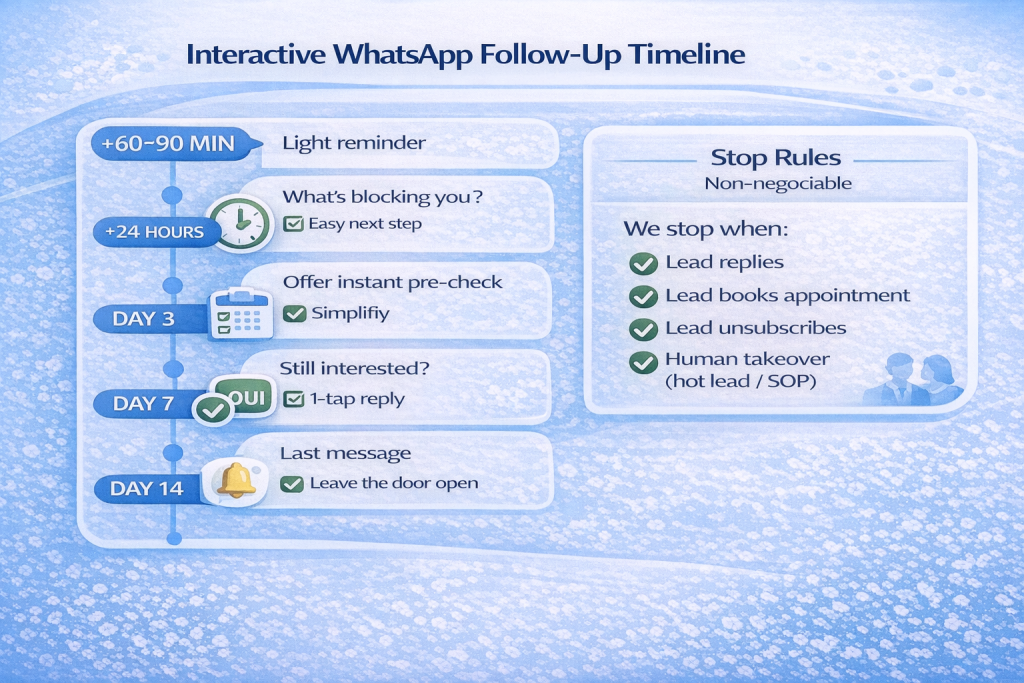
A proven follow-up rhythm (example):
- +2 hours: “Just making sure you saw my last message — want to do hair or beard?”
- Next day: “If you want, send photos here and we’ll confirm eligibility + an estimated graft range.”
- Day 3: “Would you like me to send available consultation slots?”
- Day 7: “No pressure — should I close your file for now, or are you still considering it?”
That last message is powerful because it prompts a response without sounding needy.
Scripted vs Adaptive Mode (Strict vs Flexible) — Which One Wins?
Your instinct here is correct: you do want two modes.
Strict / Scripted Mode (best for consistency)
Use when:
- you want predictable quality,
- you need brand/medical compliance,
- you have lots of staff turnover.
It follows a tight “question → answer → next step” flow.
Flexible / Adaptive Mode (best for high rapport)
Use when:
- the lead is emotional/anxious,
- the conversation is complex,
- the lead is high-ticket and needs trust.
It adapts tone while still collecting required info.
Best practice:
Run Strict mode by default, switch to Flexible when the lead is hot or sensitive.
Metrics to Track (So You Can Improve Every Week)
If you track only 4 KPIs, track these:
- Time to first reply (median + after-hours)
- Photo completion rate (% of leads who send usable photos)
- Consult booking rate (% of WhatsApp inquiries that book)
- Handoff speed (hot lead → human contact time)
When you measure these, improving conversion becomes a weekly operational task — not guesswork.
Implementation Blueprint (48 Hours to Go Live)
Day 1 (Setup):
- Map your intake questions (minimum viable)
- Decide strict vs flexible rules
- Define what qualifies as “hot”
- Create message templates + handoff alerts
- Connect WhatsApp + CRM logging
Day 2 (Launch):
- Test with real chats
- Add “human takeover” triggers
- Tune tone + shorten messages
- Deploy + monitor daily for 7 days
Compliance & Patient Experience Notes
WhatsApp requires:
- you only message people who gave you their number and opted in,
- replies without a template are limited to a 24-hour window after the user’s last message, and outside that window you typically need approved templates,
- and if you use automation, you should have clear escalation paths to a human (handoff, phone, email, form, etc.).
Also: keep sensitive medical/health details handled appropriately and avoid over-collecting unnecessary info in chat.
Ready to Automate Your WhatsApp Lead Intake?
If you want, we can set up a WhatsApp intake + follow-up automation for your clinic so you reply instantly, qualify leads consistently, and turn more inquiries into booked consultations.
👉 Contact us here: https://systemize.ca/contact/
FAQ
1) Do we need the WhatsApp Business App or the WhatsApp Business Platform?
If you want automation + logging + routing at scale, you typically need the Platform. If you’re small, start with the app, but you’ll hit limits fast.
2) Can it handle multiple languages?
Yes — language detection + saved replies/paths per language is one of the highest ROI upgrades for international clinics.
3) Will it feel like a bot?
Not if the copy is short, natural, and the system escalates to humans for hot leads.
4) Can we use multiple WhatsApp numbers?
Yes — common setups include separate numbers for regions/languages or departments.
5) Does it integrate with our CRM?
Yes — at minimum it should log: contact, timestamps, status, photos received, next step, and assigned coordinator.
6) What’s the fastest win?
Instant replies + photo capture + a structured follow-up timeline. That alone usually lifts bookings without changing ads.

 using WordPress and
No responses yet